Simple panorama tool worth considering
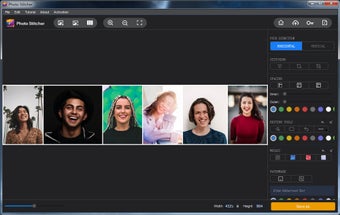
Photo Stitcher is a straightforward utility designed to help you merge multiple images into a single combined picture, whether you need a long screenshot or a panorama. With this photography app you can quickly assemble vertical or horizontal collages, making it convenient for sharing conversation screenshots or merging photos from an event into one seamless image.
Top Recommended Alternative

Photo Stitcher offers a friendly and accessible way to combine images without requiring advanced photo‑editing skills. The program makes it easy to generate before‑after comparisons or long collages, useful whether you’re organizing personal photos or preparing materials for work or school projects. The app has free and paid versions.
Effortless photo merging made simple
For users seeking an intuitive way to create collages or combine images, this program offers a straightforward workflow. You can drag and drop photos, select either horizontal or vertical layouts, and let the tool handle the automatic merging. Additional options allow you to reorder images, tweak spacing, and add annotations or watermarks, making it ideal for casual users who want a simple yet effective photo-stitching experience.
While Photo Stitcher performs well for basic image merging, it has notable limitations for advanced editing. It lacks detailed retouching, HDR blending, and exposure correction across stitched images, which might be noticeable when combining photos with different lighting or angles. Casual users may find it sufficient, but those seeking professional-level panorama stitching or advanced photo enhancements may need a more comprehensive tool.
Performance and usability remain consistent throughout. The tool handles multiple image merges quickly, keeping file quality intact while providing a smooth workflow. Its design caters to both personal and professional use, such as creating before-after comparisons or event collages. Although the free version imposes limits on the number of merges, the program remains a convenient and reliable solution for everyday photo-stitching tasks.
Reliable and simple photo merging solution
Photo Stitcher is a solid choice if you mainly need a quick, simple way to merge photos or screenshots — for example, for social‑media posts, event documentation, or basic panoramas. It excels in its ease of use, drag‑and‑drop workflow, and straightforward editing tools. On the other hand, if what you need is professional‑grade panorama stitching or heavy editing / blending features, this program may feel too limited.